


Publix Delivery & Curbside
4.716.97K Reviews
App Specs
- Version
- 9.30.0
- Updated On
- License
- Free
- Downloads
- 1,000,000+
- Developer
- Publix Super Markets Inc.
- Categories
- Food & Drink
- Platform
- Android, iOS
Screenshots
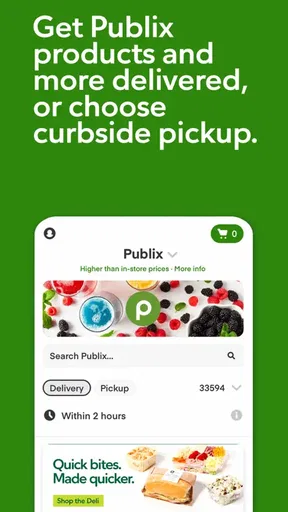
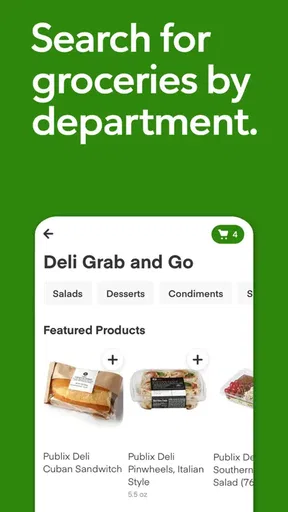
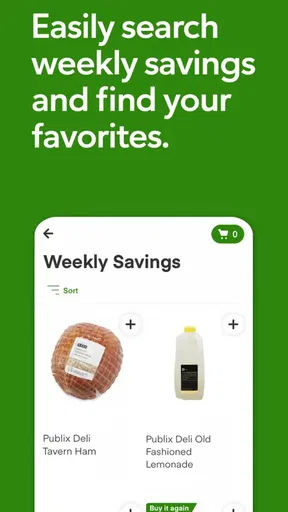
 Analysis by AppCompare
I came away from Publix Delivery & Curbside with the impression that it is most useful when you want to turn a regular Publix trip into a planned task rather than an extra stop in your day. It is a free Food & Drink app from Publix Super Markets Inc., built around grocery ordering, delivery, and curbside collection. The central idea is simple: choose what you need in the app, then have the order brought to your door or prepared for pickup.
That simplicity is also the reason I would not describe it as a complete replacement for every kind of grocery shopping. I found it strongest for repeat purchases, busy weekdays, and situations where avoiding the aisles matters more than browsing. It is less compelling when I want to compare products in person, inspect fresh items myself, or make a very small last-minute purchase without planning ahead.
How Publix Delivery & Curbside feels today
The app is powered by Instacart, so the experience sits between a Publix shopping tool and an online grocery fulfillment service. That matters because the app is not merely a digital version of a paper list. It is designed to move from product discovery to an actual order, with delivery to your home or a curbside handoff at the store.
In everyday use, I would begin by treating the basket as a working plan rather than a final commitment. I add the items I know I need, review the order carefully, and then decide whether delivery or curbside makes more sense. That small change in mindset helps because online grocery orders can expose substitutions, availability issues, and timing choices that are easy to overlook when shopping in person.
The current Android listing identifies version 9.30.0, with support beginning at Android 8.0. That makes the app accessible on many older Android phones, although the quality of the experience will still depend on the device, connection, and how smoothly the store inventory is reflected while you shop. On iOS, the same basic question applies: the service is only as useful as the local fulfillment experience behind the screen.
Publix has been associated with a polished in-store shopping experience, and I think the app works best when it preserves that sense of organization. The basket is easier to manage when I shop by need: breakfast items together, household supplies together, and ingredients for a specific meal in one pass. This is more practical than opening the app repeatedly throughout the day and adding isolated items without checking the whole order.
One detail I would pay attention to is the difference between delivery and curbside pickup. Delivery saves the trip entirely, which is valuable after work, during bad weather, or when carrying groceries is difficult. Curbside is often the better compromise when I am already near the store or want to avoid walking through the aisles but still prefer to collect the order myself. Choosing between them is not just a convenience preference; it changes how much time and uncertainty the order introduces.
Worth Reading Before You Choose

EA SPORTS FC Mobile 26 Is a Bigger Football Game, but It Takes Time

Flipboard Shows What News Apps Must Do Beyond the Feed

Switching to Android Auto Means Rethinking Your Driving Routine

Google Calendar Makes a Crowded Week Easier to Manage

Ludo King Makes the Most of the Minutes Between Plans

Baby Panda World Brings Quick Play to Modern Phones, but Its Game Library Feels Busy
A realistic weekday workflow
Imagine that I finish work late, have breakfast supplies running low, and do not want to spend the evening walking through a store. I can build the basket while commuting or during a break, check the order before submitting it, and choose delivery if the timing works. If delivery is not convenient, curbside lets me place the order in advance and collect it on the way home.
The useful part is not simply avoiding the aisles. It is separating the thinking from the physical trip. I can remember what the household actually needs, compare the basket with my meal plans, and remove impulse purchases before I arrive at the store. For families, that can make a bigger difference than the few minutes saved at checkout.
There is a practical catch: I would not leave the order until the last possible moment if the groceries are important for a particular meal. Availability can change, and a replacement may not be what I wanted. A good habit is to review the order earlier than necessary, especially when buying a specific brand, size, flavor, or ingredient that does not have an easy substitute.
What the version and history suggest
The app was released on October 23, 2017, and its current version shows that it has continued to evolve rather than remaining a one-time ordering experiment. I see that as a positive sign for an app that depends on changing store systems, mobile operating systems, and delivery workflows. Grocery apps need ongoing maintenance because a small checkout or availability problem can affect the entire purpose of the product.
Still, a newer version number should not be treated as proof that every part of the experience is perfect. The important question for an existing user is whether the current build feels stable during the moments that matter: searching, building a basket, reviewing substitutions, selecting fulfillment, and completing an order. Those steps are more meaningful than visual changes alone.
For someone who has used an older release, the main benefit of staying updated is likely continuity with the current ordering process. I would keep the app current before relying on it for a large shop or an important delivery. That is not because every update transforms the interface, but because an ordering app has to communicate correctly with the service that prepares and hands over the groceries.
The app has reached over one million installs and holds a 4.7 average from around thirty-nine thousand ratings, with roughly seventeen thousand written reviews. Those figures suggest that it has found a substantial audience and that many users consider it dependable enough to keep using. I would read that as useful context, not as a guarantee that every store, delivery window, or order will feel identical.
Where the app helps regular Publix shoppers
The clearest advantage is continuity. If Publix is already the store I prefer, I do not need to learn an unrelated grocery marketplace just to place an order. The app keeps the shopping decision connected to the Publix name while using Instacart to power the delivery side.
I also like the way a digital basket can reduce forgotten essentials. Before submitting an order, I can pause and ask whether I have covered the full meal, the next few breakfasts, or the household items that are easy to remember only after returning home. That review step is more valuable than simply searching quickly and checking out.
Another less obvious use is curbside as a time-control tool. Delivery is convenient, but curbside can be preferable when I am already driving past the store and do not want to depend on someone bringing the order at home. It also keeps the final handoff connected to a trip I was making anyway. For a busy routine, that can be a better fit than automatically choosing delivery every time.
For older relatives or anyone who finds a full store tiring, the app can also support a more deliberate shopping routine. A family member can help prepare the basket remotely, and the recipient can receive the groceries through delivery or collect them with curbside. I would still make sure the person is comfortable checking the final order, because substitutions and unavailable items deserve attention rather than being accepted blindly.
The small habits that make ordering safer
My first recommendation is to build the basket around meals and household routines, not around the order in which search results appear. Search encourages one-item decisions. A meal-based review exposes missing ingredients and helps prevent buying several convenient items without anything that actually forms a complete dinner.
My second recommendation is to inspect every important product before checkout. When a particular item matters, I would not assume that a similar-looking result is equivalent. Package size, dietary requirements, and intended use can make a replacement unsuitable. This is especially important for baking, allergy-sensitive shopping, and recipes where one ingredient cannot easily be changed.
Third, I would use curbside strategically instead of viewing it as a weaker version of delivery. If I am already near the store, pickup may reduce the uncertainty of waiting at home. If I am sick, caring for a child, or unable to travel easily, delivery is the more meaningful benefit. The right choice depends on the day, not on which option sounds more convenient in general.
Finally, I would keep a little flexibility in the plan. Online grocery shopping feels precise, but store stock can make the final basket less predictable than the screen suggests. If a meal depends on one exact product, I would have a backup idea before ordering. That simple preparation prevents the app from becoming the source of a last-minute dinner problem.
What may frustrate existing and new users
The biggest limitation is that convenience does not remove the judgment involved in grocery shopping. I still need to check the basket, think about replacements, and make sure the selected fulfillment method suits my schedule. Someone hoping to tap a few items and forget the order may be disappointed when the final details require attention.
Fresh food is another area where personal preference matters. When I shop in person, I can inspect produce, choose among package sizes, and change my mind immediately. With delivery or curbside, I give up some of that direct control. That trade-off may be worthwhile for routine groceries, but it is less attractive when freshness or exact selection is the main priority.
The app may also be less useful for spontaneous shopping. If I need one item immediately, opening the app, checking availability, arranging fulfillment, and waiting for the handoff can be more effort than a quick store visit. In that situation, the traditional alternative is better, even for someone who otherwise enjoys online ordering.
There is also a difference between wanting Publix specifically and wanting the lowest possible grocery cost. This app makes sense when store preference, convenience, and a familiar shopping environment matter. If my priority is comparing prices across many retailers, a broader grocery marketplace may suit me better. I would not choose this app expecting it to function as a universal price-comparison tool.
People who dislike substitutions should approach delivery and curbside with a clear plan. I would order earlier, review important products closely, and avoid building a meal around an item that has no practical alternative. That does not eliminate the issue, but it makes the service more manageable.
Who should use it, and who should skip it
I think it is a strong fit for regular Publix customers who already know what they buy and want a quicker way to repeat those purchases. It is also useful for parents, commuters, people managing limited mobility, and anyone who would rather spend ten minutes planning than spend longer navigating a store.
It is a particularly good match for scheduled household shopping. A weekly basket can be prepared with fewer distractions, checked against the pantry, and sent through the fulfillment option that best fits the day. The app becomes less about convenience as a novelty and more about making grocery errands predictable.
I would be more cautious about recommending it to someone who enjoys browsing for new products, wants to personally select fresh food, or regularly shops based on immediate discounts and changing shelf conditions. Those shoppers may get more value from visiting the store or using a service that compares several retailers.
I would also skip it for a tiny emergency purchase unless I was already planning another order. The service is most efficient when the basket is substantial enough to justify the planning and handoff. For one forgotten ingredient needed right now, the usual local-store visit remains simpler.
Privacy, access, and practical expectations
The app is free to install and has an Everyone content rating, so the basic barrier to trying it is low. That does not mean every order decision is frictionless. I would still consider whether delivery or pickup fits my location and routine before building a large basket, because the value depends on the service being practical where I live.
The Android minimum of 8.0 is helpful for people using an older phone, although an older device may make searching and checkout feel less comfortable than on newer hardware. I would also avoid placing an important order over an unreliable connection. Losing progress while building a large basket is exactly the kind of frustration that can make an otherwise useful service feel unreliable.
Because the delivery side is powered by Instacart, I would think of the experience as a connected service rather than an isolated Publix catalog. That connection is what makes delivery possible, but it also means that the quality of the final experience involves more than the app interface. Store preparation, item availability, timing, and the handoff all matter.
What I would watch as the app continues to develop
For future updates, I would pay attention to how clearly the app communicates changes to an order. The most valuable improvement would not necessarily be a decorative redesign; it would be better visibility when an item is unavailable, when a replacement needs attention, or when the chosen fulfillment plan changes.
I would also watch the balance between speed and control. A fast reorder flow is excellent for familiar staples, but it should not make it harder to inspect the basket before submission. The best version of this app would make repeat shopping quick while preserving careful review for products that matter.
Another area worth watching is the relationship between delivery and curbside. These options serve different routines, and the app should make that difference obvious rather than treating them as interchangeable buttons. Clearer timing, preparation status, and handoff instructions would have a direct effect on whether users feel in control.
After using it as a grocery-planning tool rather than a simple product browser, I find Publix Delivery & Curbside easy to recommend to the right person. It is free, widely used, and supported by an established Publix shopping workflow with Instacart powering delivery. Its best qualities appear when I have a repeatable basket, a busy schedule, and a clear reason to avoid ordinary in-store shopping.
My recommendation comes with one condition: treat the order as something to review, not something to set and forget. If I check important products, choose delivery or curbside based on the actual day, and keep a backup plan for less predictable items, the app can remove a meaningful amount of grocery-shopping effort. If I need instant shopping, exact fresh-food selection, or broad retailer comparison, I would choose a different approach instead.
Pros
- Easy ordering from the Publix app or website
- Scheduled delivery and curbside pickup options
- Fresh groceries can be added alongside household essentials
- Order updates help track preparation and fulfillment
- Useful for avoiding in-store shopping during busy periods
Cons
- Availability depends on participating Publix locations
- Delivery and service fees may increase the total cost
- Substitution choices can affect the final order
- Popular pickup times may sell out quickly
- Age-restricted items may require ID verification
FAQs for Publix Delivery & Curbside
What is Publix Delivery & Curbside, and how does it work?
Publix Delivery & Curbside lets you shop for groceries through the app instead of walking through the store. You can browse available products, add items to your cart, choose either home delivery or curbside pickup, select a convenient time slot, and pay during checkout. Product availability, pickup locations, delivery areas, and scheduling options may vary depending on your local Publix store.
Can I use Publix Delivery & Curbside to order all products available in a store?
The app provides access to a broad selection of Publix groceries, including fresh food, pantry staples, beverages, household items, and other everyday products. However, the catalog may not include every item found in a physical store. Availability can change quickly, especially for fresh produce, bakery items, popular products, or items affected by local inventory. Substitution options may be offered when something is unavailable.
What is the difference between Publix delivery and curbside pickup?
With delivery, your order is brought to the address you provide during the selected time window, making it useful when you cannot visit the store. Curbside pickup requires you to drive to the participating Publix location, park in the designated area, and notify the store that you have arrived. Pickup can be convenient for avoiding shopping inside, while delivery may include additional service, delivery, or other applicable fees.
How much does Publix Delivery & Curbside cost, and what payment methods are accepted?
The total price depends on the products you select, your store, the fulfillment method, and any applicable delivery, service, or pickup-related charges. Some promotions or minimum order requirements may also affect the final amount. Before confirming an order, review the checkout summary carefully for fees and taxes. The app generally supports electronic payment methods available through the service, although accepted options can vary by location.
Can I change, cancel, or modify an order after placing it?
You may be able to edit or cancel a Publix Delivery & Curbside order before the store begins processing it, but the available window is limited and depends on the order status and selected time slot. Open the order details in the app as soon as possible to check for available options. Once shopping or preparation has started, changes may no longer be possible, and substitutions or refunds may be handled according to the store’s policies.


